Your .zshrc should be: ~/.zshrc
This is now the default in os X
OS X
- Install Command Line Developer Tools
- Install iTerm2
- Install ZSH
- Install Oh-My-Zsh
Install Oh-My-Zsh
sh -c "$(curl -fsSL https://raw.githubusercontent.com/ohmyzsh/ohmyzsh/master/tools/install.sh)"
Modify your .zshrc
Confirm that you have the correct paths:
- NVM (Node Version Manager)
  export NVM_DIR="$HOME/.nvm"
  [ -s "$NVM_DIR/nvm.sh" ] && . "$NVM_DIR/nvm.sh"  # This loads nvm
  source ~/.nvm/nvm.sh
Add this line to get bash completion (tab to hint/complete) for nvm commands
[ -s "$NVM_DIR/bash_completion" ] && \. "$NVM_DIR/bash_completion" # This loads nvm bash_completion
- SSH_KEYS
For some reason, sometimes this line is commented out. Uncomment it to fix issues with ssh.
  # ssh
  export SSH_KEY_PATH="~/.ssh/rsa_id"
Configure oh-my-zsh installation.
- Set the Path to OMZ (this should be done at or near the top of your zshrc)
export ZSH="$HOME/.oh-my-zsh" - Set the theme (if you want) There are hundreds of themes, check out the github page for more.
In zshrc:
# ZSH_THEME="robbyrussell" # Replace this
ZSH_THEME="agnoster" # with this ... or what ever your theme name is
- Plugins
There are so many super useful plugins for zsh. Here you can find tonnes of awesome zsh plugins
plugins=(
  git
)
** Note that the plugins are separated by whitespace (spaces, tabs, new lines…). Do not use commas between them or it will break.
- Load oh-my-zsh
This must be done AFTER setting the path, theme and plugins
source $ZSH/oh-my-zsh.sh
Auto Load Node Version
# place this after nvm initialization!
autoload -U add-zsh-hook
load-nvmrc() {
  local node_version="$(nvm version)"
  local nvmrc_path="$(nvm_find_nvmrc)"

  if [ -n "$nvmrc_path" ]; then
    local nvmrc_node_version=$(nvm version "$(cat "${nvmrc_path}")")

    if [ "$nvmrc_node_version" = "N/A" ]; then
      nvm install
    elif [ "$nvmrc_node_version" != "$node_version" ]; then
      nvm use
    fi
  elif [ "$node_version" != "$(nvm version default)" ]; then
    echo "Reverting to nvm default version"
    nvm use default
  fi
}
add-zsh-hook chpwd load-nvmrc
load-nvmrc
Add NPM Completion
Get bash completion (tab to hint/complete) for npm commands, even the run commands from a package.json.
npm completion >> ~/.zshrc
Fonts
Roboto - Often recommended
brew tap homebrew/cask-fonts && brew cask install font-robotomono-nerd-font
Noto - Like Roboto, but with support for more characters (I use it because it has Japanese and Korean Mono spaced fonts)
brew cask install font-noto-nerd-font
Then set your chosen font in iterm’s Preferences -> Profiles -> Text:
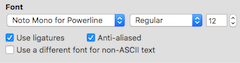
There are so many fonts. These are just a couple of suggestions, but if you select another font, be sure to pick one that is patched with glyphs. Nerd Fonts is a great repo.
iTerm Colours
ref: https://github.com/MartinSeeler/iterm2-material-design
-
download the file material-design-colors.itermcolors
-
iTerm2 > Preferences > Profiles > Colors Tab
-
Click Color Presets…
-
Click Import…
-
Select the material-design-colors.itermcolors file
-
Select the material-design-colors from Load Presets…
Directory Path too Long
You can use shrink path.
But that broke my custom theme, so I edited my theme
~/.oh-my-zsh/themes/agnoster.zsh-theme
  prompt_dir() {
    # Shorten the Displayed Directory Path to the last 2 Directories
    # https://medium.com/@shandou/how-to-shorten-zsh-prompt-oh-my-zsh-14185f3e7ab7
    prompt_segment blue $CURRENT_FG '%2~'
  }
References
Source: oh my zsh + powerline fonts in vscode
https://medium.com/ayuth/iterm2-zsh-oh-my-zsh-the-most-power-full-of-terminal-on-macos-bdb2823fb04c